Big Button - Part 17 - The System Manager and Startup Coordination
Table of Contents
Introduction
💻 HACKER We spend some time setting up our code structure to where all the things start up asynchronously “at the same time”. Currently, there is no real guarantee that our entire system will be ready at the same time for our user.
That is, The button code and its button press monitoring loop may be initialized, while the LED’s, buzzers, WiFi networking, or any other subsystem are still in the process of getting ready.
For example, when the user initially presses the big button, the resulting internet interaction tasks may not work since they have not fully connected to the internet.
We need some type of system orchestrator or manager!

In this case, a system manager will watch the status of each subsystem. Each subsystem will signal to the system manager when it is ready to be used. Once each subsystem is ready, the system manager will broadcast that the entire system is ready.
The System Manager
As stated before, our system manager will make sure that all subsystems are ready before the system can be used.
This specifically means two things:
- Wait for all subsystems to report that they are ready
- Send out a global signal that system is ready
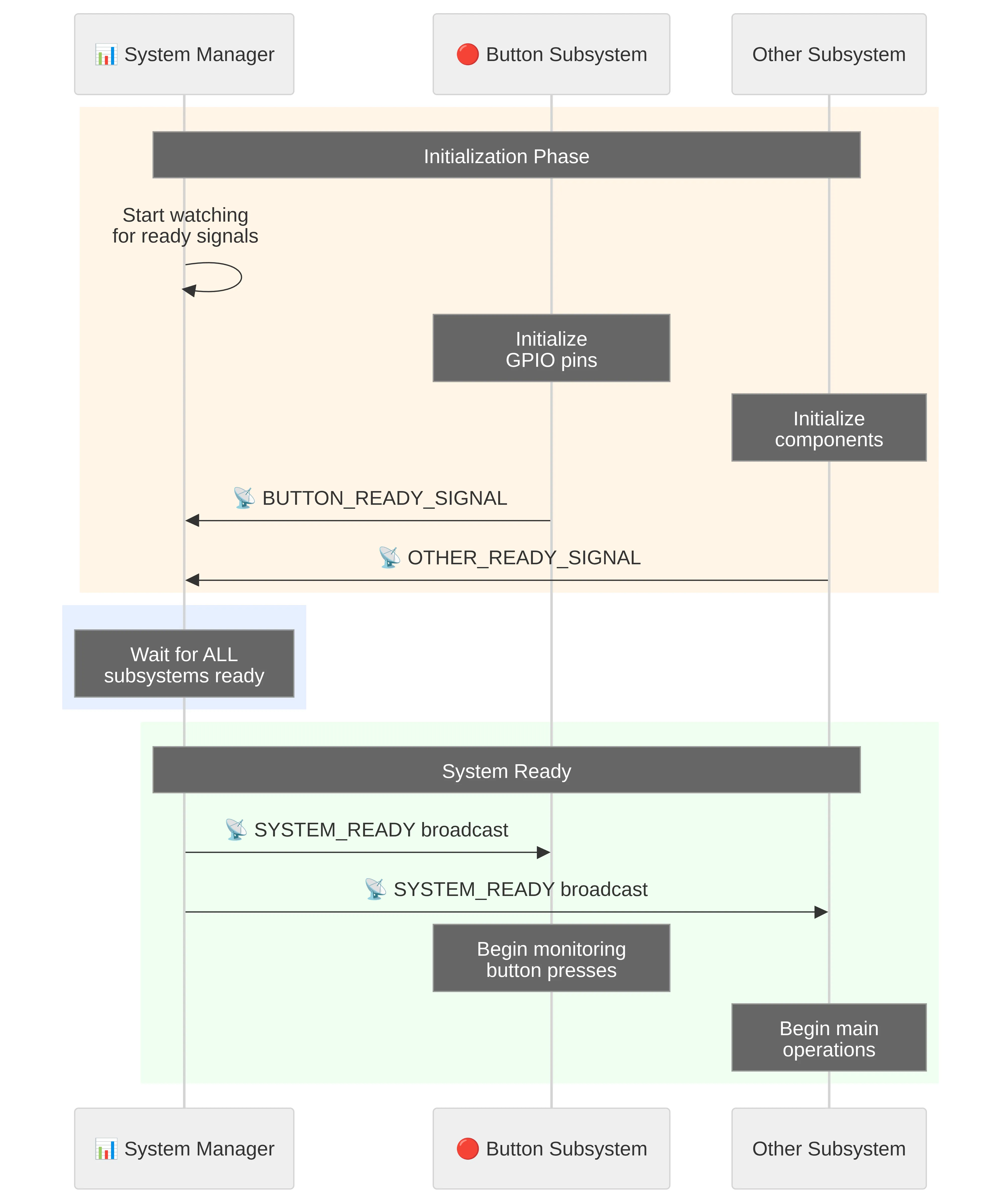
To show this in another way, let’s take a look at a sequence diagram that shows the interaction between the system manager and other subsystems.
NOTE
A sequence diagram is a visual representation that shows how different parts of the system communicate with each other over time. It effectively shows who interacts with who. Don’t get intimidated by the looks of it, just read it from top to bottom, keeping in mind what each vertical line represents.
File Changes
For a quick indicator of what files we will add or change in this part,
expand the following file tree. Here we are only showing the src
project directory.
12 collapsed lines
src├── button│ ├── consumer_loop.rs # <--- Changes│ ├── core.rs│ ├── messaging.rs # <--- Changes│ ├── mod.rs # <--- Changes│ └── utility.rs # <--- New├── clocks_config.rs├── main.rs # <--- Changes├── state_machine.rs # <--- Changes├── system_manager.rs # <--- New└── utility.rssrc/system_manager.rs
So the very first thing we will do is actually define our infamous system manager. Although we build this system manager concept up to where it might sound complex, all it really is are two things:
-
A pub-sub channel (
SYSTEM_READY_PUBSUB_CHANNEL) that each subsystem subscribes to in order to see when the entire system is ready. -
A async-task that waits for each subsystem to be ready before sending out a system ready signal.
In the below code, we are only using our currently existing button subsystem and
waiting for this button subsystem to be ready with BUTTON_READY_SIGNAL.wait().await;.
However, in subsequent tutorial sections, we will add to this list (i.e. LEDs, buzzers, etc.).
//! System manager
use defmt::*;use defmt_rtt as _;use panic_probe as _;
use embassy_sync::blocking_mutex::raw::ThreadModeRawMutex;use embassy_sync::pubsub::PubSubChannel;
use crate::button::BUTTON_READY_SIGNAL;
//////////////////////////////////////////////////////////////////////////////// SYSTEM READY SIGNAL//////////////////////////////////////////////////////////////////////////////
/// System ready pub-sub topic channel/// 1 total capacity/messages, 4 subscribers, and 1 publisherpub static SYSTEM_READY_PUBSUB_CHANNEL: PubSubChannel<ThreadModeRawMutex, (), 1, 4, 1> = PubSubChannel::new();
/// Async task - Waiting for all subsystems to report back as ready#[embassy_executor::task]pub async fn wait_for_system_ready() { info!("Running System ready async task ..."); info!("Waiting for system to be ready ...");
// Waiting for each system component to report back as ready BUTTON_READY_SIGNAL.wait().await; // ... Add other ready signal here ...
// Signal out that the system is ready SYSTEM_READY_PUBSUB_CHANNEL.publisher().unwrap().publish(()).await; info!(">>>>>>>>> ALL SYSTEMS GO! BIG BUTTON IS READY! <<<<<<<<<");}After all subsystems are ready to go, a signal will be sent out and a message will be logged.
Note that the BUTTON_READY_SIGNAL will be defined in the next section when
we update src/button/messaging.rs.
src/button/messaging.rs
Generally speaking, each subsystem that is reporting to the system manager will need its own ready signal/flag. As shown above, this signal is then monitored by the system manager.
Since we have our button subsystem, let’s add this signal/flag to it. We will simply use
the Signal
communication primitive.
use embassy_sync::blocking_mutex::raw::ThreadModeRawMutex; // Ensure thread-safety across tasksuse embassy_sync::pubsub::PubSubChannel;use embassy_sync::signal::Signal;use embassy_time::Instant;
23 collapsed lines
/// Button press type#[derive(Debug, Copy, Clone, PartialEq)]pub enum PressType { /// Short button press type ShortRelease, /// Long button press type LongRelease, /// Long hold LongHold,}
/// Button pub-sub message item definition/structure that is passed via channel#[derive(Debug, Copy, Clone)]pub struct ButtonMessage { /// Button ID pub id: u8, /// Timestamp of button press start pub timestamp_start: Instant, /// Timestamp of button press end pub timestamp_end: Instant, /// The type of button press pub press_type: PressType,}
/// Button pub-sub topic channel/// Other program parts can listen to this topic to get button press events/// 3 total capacity/messages, 3 subscribers, and 1 publisherpub static BUTTON_PUBSUB_CHANNEL: PubSubChannel<ThreadModeRawMutex, ButtonMessage, 2, 3, 1> = PubSubChannel::new();
/// A signal / flag that signals that the button system readypub static BUTTON_READY_SIGNAL: Signal<ThreadModeRawMutex, bool> = Signal::new();NOTE
In embassy, Signal
is a signaling datatype for a single consumer. It is effectively a boolean programming flag
between asynchronous tasks. This is very useful when the receiver (i.e. system manager) only cares
about the latest status from the sender (i.e. subsystem). This is often used for “state” updates.
src/button/consumer_loop.rs
Now the button subsystem will do two things:
-
Once ready, send off a signal/flag to the system manager with
BUTTON_READY_SIGNAL -
Wait for the system manager to send pub-sub message that the system is ready with
SYSTEM_READY_PUBSUB_CHANNEL
Once both of these are done, the button subsystem is able to enter the monitoring loop within
button.monitor_press().
Note that we will define utility::do_nothing_idle() in the very next code addition section.
6 collapsed lines
//! Button module - Task manager module
use defmt::*;use defmt_rtt as _;use panic_probe as _;
use embassy_futures::select::select;use embassy_rp::gpio::Input;
use super::BUTTON_READY_SIGNAL;use super::Button;use super::utility;use crate::system_manager::SYSTEM_READY_PUBSUB_CHANNEL;
/// Async task - Button/// Continuously monitor and report button press/release events////// * `button_info` - Button information vector#[embassy_executor::task]pub async fn start_button_monitor(button_info: [(u8, Input<'static>); 1]) { info!("Running Button monitor async task ..."); let mut button = Button::new(button_info).unwrap();
// Signal to system that button is ready to be used BUTTON_READY_SIGNAL.signal(true);
// Wait idle until the system manager sends a ready signal let mut system_ready_message = SYSTEM_READY_PUBSUB_CHANNEL.subscriber().unwrap(); select(system_ready_message.next_message_pure(), utility::do_nothing_idle()).await;
// Start the continuous button monitor watch button.monitor_press(0).await;}Let’s highlight the select()
embassy async function here.
This basically says to wait for one of two async functions and select the one that completes first.
In this case, either we have a system ready message that has been send from the system manager
OR the infinite loop within utility::do_nothing_idle() has completed (unlikely).
Effectively, we are simply waiting for a system ready message from the system manager to
proceed to the button monitor.
We are using select() for a few different reasons:
- Flexible and extensible - Easy to add timeouts, alternative conditions, or fallback behaviors
- Clear async pattern - Common idiom in Embassy/embedded Rust that experienced developers recognize
- Non-blocking - Maintains cooperative multitasking even while “waiting”
- Educational value - Shows proper use of async primitives for tutorial readers
Just as a side note, Embassy offers functions like select3, select4, and so on for
three, four, or more async futures.
src/button/utility.rs
This is the idle / infinite loop function we have used before in the async select()
function. Nothing complicated to see here …
//! Button - Utility functions
use embassy_time::Timer;
/// Create a future that doesn't do anything except wait/// This can be used for placeholder for anything that idlespub async fn do_nothing_idle() { loop { Timer::after_millis(1000).await; }}src/button/mod.rs
To expose our new button code we have created, we will add the references to this file. This way the references to this new code will be available outside of this button module.
//! Button module - Module definition - Responsible for handling system buttons
// Map all parts of this modulemod consumer_loop;mod core;mod messaging;mod utility;
// Public re-export of specifics that are available outside of modulepub use consumer_loop::start_button_monitor;pub use core::Button;pub use messaging::{BUTTON_PUBSUB_CHANNEL, BUTTON_READY_SIGNAL, ButtonMessage, PressType};src/state_machine.rs
Here we want to have the state machine wait until the system is ready. That is, after system power on, wait to handle any states until all subsystems have signaled to the system manager that they are ready.
First let’s import the SYSTEM_READY_PUBSUB_CHANNEL that we will monitor for our
ready message.
12 collapsed lines
//! State machine module for the embedded application
#![allow(dead_code)] // only used for development#![allow(unused_variables)] // only used for development
use defmt::*;use defmt_rtt as _;use panic_probe as _;
use embassy_sync::blocking_mutex::raw::ThreadModeRawMutex;use embassy_sync::pubsub::Subscriber;use embassy_time::Timer;
use crate::button::{BUTTON_PUBSUB_CHANNEL, ButtonMessage, PressType};use crate::system_manager::SYSTEM_READY_PUBSUB_CHANNEL;Next we define the pub-sub channel subscriber and wait for the next message to come in.
You are probably thinking: “hey wait! Why are we not doing the select() async thing here?”.
Then I would be thinking: “Well, we are not really anticipating extending the code and replacing
the idle ‘do-nothing’ function with something”
/// State machine task with infinite loop#[embassy_executor::task]pub async fn state_machine_task() -> ! { info!("Running State Machine async task ..."); let mut state_machine = StateMachine::new(State::Startup, Event::PowerOn);
// Send a "PowerOn" event to state machine to handle state_machine.handle_event(Event::PowerOn).await;
// Waiting on system to be ready to proceed let mut system_ready_message = SYSTEM_READY_PUBSUB_CHANNEL.subscriber().unwrap(); system_ready_message.next_message_pure().await;
// Send a "Ready" event to state machine to handle state_machine.handle_event(Event::Ready).await;
// Main infinite loop for the state machine loop {8 collapsed lines
// Get the current event let current_event = state_machine.get_current_event().await;
// Handle the event and update the state state_machine.handle_event(current_event).await;
// Add a small delay to prevent tight looping Timer::after_millis(10).await; }}src/main.rs
Now the only thing left to do is to tie it all back to our main.rs entry by
starting up the new system manager.
We will first import the brand new system manager module.
13 collapsed lines
#![no_std]#![no_main]#![allow(unused_variables)] // only used for development#![allow(unused_imports)] // only used for development
use defmt::*;use defmt_rtt as _;use panic_probe as _;
use embassy_executor::Spawner;use embassy_rp::config::Config as HalConfig;use embassy_rp::gpio::{Input, Pull};use embassy_time::Timer;
mod clocks_config;use clocks_config::ClockSettings;mod button;mod state_machine;mod system_manager;mod utility;Next we are simply starting up a async task that calls our initially defined wait_for_system_ready()
within file src/system_manager.rs.
#[embassy_executor::main]async fn main(spawner: Spawner) {18 collapsed lines
info!("=================================="); info!(" Package: {} v{}", env!("CARGO_PKG_NAME"), env!("CARGO_PKG_VERSION")); info!("==================================");
// Apply default clock configuration let mut hal_configuration = HalConfig::default();
info!("Configuring all system clocks ..."); let clock_settings = ClockSettings { xosc_crystal_hz: 12_000_000, // RP2350 uses 12MHz crystal system_frequency_mhz: CLOCK_SYSTEM_FREQUENCY_MHZ.parse::<u32>().unwrap(), usb_frequency_mhz: CLOCK_USB_FREQUENCY_MHZ.parse::<u32>().unwrap(), peripheral_clock_divider: CLOCK_PERIPHERAL_DIVIDER.parse::<u8>().unwrap(), adc_frequency_mhz: CLOCK_ADC_FREQUENCY_MHZ.parse::<u32>().unwrap(), reference_clock_divider: CLOCK_REFERENCE_DIVIDER.parse::<u8>().unwrap(), }; clocks_config::configure_all_clocks(&mut hal_configuration, clock_settings); let peripherals = embassy_rp::init(hal_configuration);
// Log and verify system clock frequencies clocks_config::print_device_frequencies(); clocks_config::verify_clock_with_timer(500).await;
//////////////////////////////////////////////////////////////////////////
// Task to check if all system components are ready to go spawner.spawn(system_manager::wait_for_system_ready()).unwrap();
//////////////////////////////////////////////////////////////////////////
// Button - Define and spawn async task let button_info = [(0_u8, Input::new(peripherals.PIN_15, Pull::Up))]; spawner .spawn(button::start_button_monitor(button_info)) .expect("Failed spawning button_consumer");
//////////////////////////////////////////////////////////////////////////
12 collapsed lines
// Spawn state machine async task spawner .spawn(state_machine::state_machine_task()) .expect("Failed spawning state machine");
info!("All Set! Running async loop ...");
// General async loop to ensure entire program runs forever while // asynchronously working on other tasks loop { Timer::after_secs(5).await; }}Summary
Just to again highlight the changes:
-
We defined the system manager that waits for all subsystems to report as ready and in turn globally signals that the system is ready
-
Added this global system check to the button subsystem and the state machine to wait when the system is ready.
-
Started up the system manager once the system initializes in
main.rs
Cool. Let’s See What This Looks Like!
In our terminal run the following command to compile our Rust code, send to the microcontroller, and run it.
cargo run --releaseHere’s what the startup sequence looks like when we run the code:
.... Compiling big-button v0.1.0 (/home/you/projects/big-button) Finished `release` profile [optimized + debuginfo] target(s) in 0.17s Running `probe-rs run --chip=RP235x --log-format '[{t}] {[{L}]%dimmed%bold} {{f:dimmed}:{l:dimmed}%30}: {s}' target/thumbv8m.main-none-eabihf/release/big-button` Erasing ✔ 100% [####################] 24.00 KiB @ 58.03 KiB/s (took 0s) Programming ✔ 100% [####################] 24.00 KiB @ 27.60 KiB/s (took 1s) Finished in 1.27s[0.000514] [INFO ] main.rs:34 : ==================================[0.000542] [INFO ] main.rs:35 : Package: big-button v0.1.0[0.000594] [INFO ] main.rs:36 : ==================================19 collapsed lines
[0.000611] [INFO ] main.rs:41 : Configuring all system clocks ...[0.000632] [DEBUG] clocks_config.rs:44 : PLL Config: 133 MHz -> refdiv=1, fbdiv=133, post_div1=6, post_div2=2[0.000676] [DEBUG] clocks_config.rs:44 : PLL Config: 48 MHz -> refdiv=1, fbdiv=120, post_div1=6, post_div2=5[0.000548] [DEBUG] clocks_config.rs:151 : Log Device Clock Frequencies:[0.000559] [DEBUG] clocks_config.rs:152 : [Oscillators][0.000570] [DEBUG] clocks_config.rs:153 : - ROSC (Ring Oscillator): 6500000 Hz[0.000592] [DEBUG] clocks_config.rs:154 : - XOSC (Crystal Oscillator): 12000000 Hz[0.000611] [DEBUG] clocks_config.rs:156 : [PLLs (Phase-Locked Loops)][0.000622] [DEBUG] clocks_config.rs:157 : - SYS PLL: 133000000 Hz[0.000645] [DEBUG] clocks_config.rs:158 : - USB PLL: 48000000 Hz[0.000665] [DEBUG] clocks_config.rs:160 : [System Clocks][0.000677] [DEBUG] clocks_config.rs:161 : - SYS CLK (System Clock): 133000000 Hz[0.000699] [DEBUG] clocks_config.rs:162 : - REF CLK (Reference Clock): 12000000 Hz[0.000718] [DEBUG] clocks_config.rs:163 : - PERI CLK (Peripheral Clock): 133000000 Hz[0.000740] [DEBUG] clocks_config.rs:165 : [Specialized Clocks][0.000751] [DEBUG] clocks_config.rs:166 : - USB CLK (USB Clock): 48000000 Hz[0.000772] [DEBUG] clocks_config.rs:167 : - ADC CLK (ADC Clock): 48000000 Hz[0.500823] [DEBUG] clocks_config.rs:131 : [System clock frequency test] Actual: 500000 microseconds -> Measured: 500023 microseconds[0.500862] [DEBUG] clocks_config.rs:143 : [System clock frequency test] Clock accuracy: 0.00% off[0.500928] [INFO ] main.rs:77 : Running async loop ...[0.500955] [INFO ] state_machine.rs:150 : Running State Machine async task ...[0.500975] [INFO ] state_machine.rs:76 : [State: Startup - Event: PowerOn][0.501026] [INFO ] consumer_loop.rs:21 : Running Button monitor async task ...[0.501075] [INFO ] system_manager.rs:23 : Running System ready async task ...[0.501088] [INFO ] system_manager.rs:24 : Waiting for system to be ready ...[0.501123] [INFO ] system_manager.rs:32 : >>>>>>>>> ALL SYSTEMS GO! BIG BUTTON IS READY! <<<<<<<<<[0.501218] [INFO ] state_machine.rs:80 : [State: Startup - Event: Ready] Startup -> IdleReading the console output logs we can see that the system manager starts up, waits for the subsystems to be ready, and finally signals that system is ready.
Obviously, in our current case, this happens relatively quickly since the button subsystem does not take very long to initialize. But as you can imagine, when dealing with slower subsystem initializations (i.e. WiFi setup), this process might take longer.
Go ahead and git commit your changes and push to GitHub.com.
OK. What’s next!? What’s next!? …
No spam. Unsubscribe any time.