Big Button - Part 16 - Detecting Short, Long, and Hold Button Presses
Table of Contents
Introduction
💻 HACKER So far we have set up our program architecture that when we simply press a button, the button press event is caught by the button module and published to anyone subscribed to its pub-sub channel.
It is common that embedded devices have limited physical space and therefore limited number of buttons. Therefore, one button sometimes has to do multiple things depending how it is pressed. For example, our single big button will have multiple functions depending on what type of button press has occurred.
Currently, our program architecture only watches for a simple button press. There is no way to distinguish between different press patterns like short presses, long presses, or long holds.

In this part, we’ll add this functionality by implementing press type detection in the button module. We’ll also integrate these press types into the state machine, allowing it to subscribe to button events and respond differently based on how the user interacts with the button.
Button Press Detection
Let’s explore how we can differentiate between multiple button press patterns using a single physical button.
Our goal is to enable one button to recognize three distinct press types:
| Press Type | Description |
|---|---|
| 🟢 Short Press Release | Button pressed and released before the long press threshold |
| 🟡 Long Press Release | Button pressed and released after the long press threshold but before the long hold threshold |
| 🔴 Long Press Hold | Button held continuously beyond the long hold threshold |
To distinguish between these three press types, our detection logic relies on two configurable time threshold constants:
- Long Press Threshold - The minimum duration that separates a short press from a long press
- Long Hold Threshold - The duration after which a continuous press becomes a hold event
To visualize this, the following diagram illustrates how the detection logic uses these thresholds to classify each button interaction:
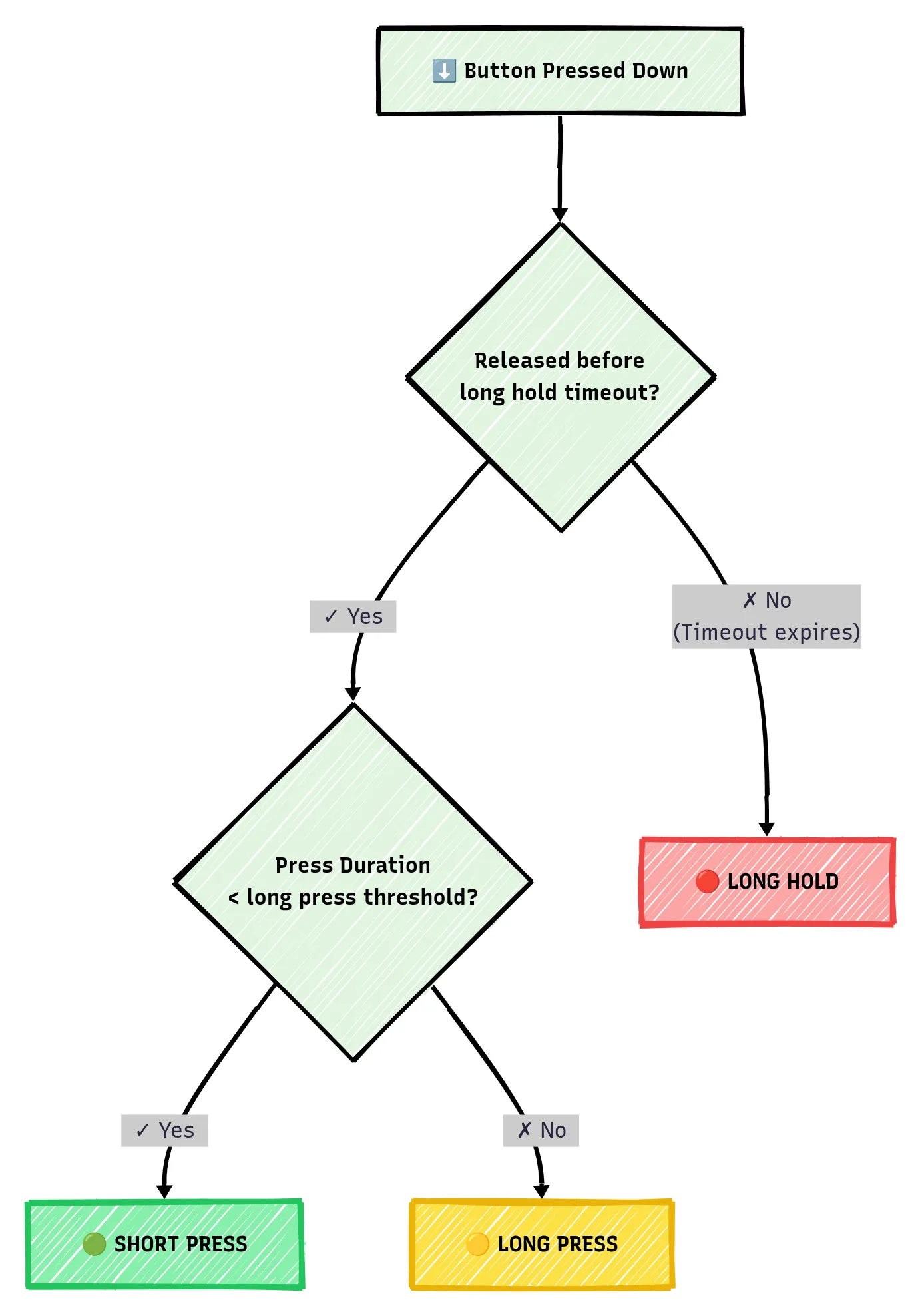
As an example, consider a configuration where the long press threshold is set to 300 milliseconds and the long hold threshold is set to 2000 milliseconds:
- Press and release after 250ms → 🟢 Short Press Release (released before 300ms threshold)
- Press and release after 500ms → 🟡 Long Press Release (released after 300ms but before 2000ms)
- Press and hold for 2100ms → 🔴 Long Press Hold (held beyond 2000ms threshold)
With our understanding of the detection logic established, let’s implement it in code.
File Changes
For a quick indicator of what files we will add or change in this part, expand the following file tree.
22 collapsed lines
.├── build.rs # <--- Changes: Add configs items├── .cargo├── Cargo.lock├── Cargo.toml├── configs.json # <--- Changes: Add config items├── .gitignore├── memory.x├── README.md├── .rustfmt.toml├── rust-toolchain.toml├── secrets.json└── src ├── button │ ├── consumer_loop.rs │ ├── core.rs # <--- Changes: Add press types │ ├── messaging.rs # <--- Changes: Add press types │ └── mod.rs ├── clocks_config.rs ├── main.rs ├── state_machine.rs # <--- Changes: Handle press types └── utility.rsconfigs.json
We know that we will need two time threshold values: Long press and long hold time threshold. Those will be defined and kept in our configuration file and added as follows:
{ "button_long_hold_threshold": "2000", "button_long_press_threshold": "300", "clock_system_frequency_mhz": "133", "clock_usb_frequency_mhz": "48", "clock_peripheral_divider": "1", "clock_adc_frequency_mhz": "48", "clock_reference_divider": "1"}build.rs
To match our changes to the configuration file, configs.json we will have to add the
added keys to the build.rs file. We also need to update the total configuration key
count from 5 to 7 in the function signature.
/// Main build script entry pointfn main() {
....
// Load configurations from local 'configs.json' file let configs_keys = [ "button_long_hold_threshold", "button_long_press_threshold", "clock_system_frequency_mhz", "clock_usb_frequency_mhz", "clock_peripheral_divider", "clock_adc_frequency_mhz", "clock_reference_divider", ];
....}
/// Loads configuration values from configs.json and generates a configs.rs file/// with Rust constants for use in the embedded application////// # Arguments/// * `out_dir` - The target build directory path/// * `config_keys` - Array of configuration keys to extract from configs.jsonfn load_configs(out_dir: &str, config_keys: [&str; 7]) -> io::Result<()> {
....
}src/button/messaging.rs
Now we know that we want to add three different button press types: Short press, long press,
and long hold. Here we are adding three new press types: ShortRelease, LongRelease,
and LongHold.
These additional press types will have to be added to our PressType within
the pub/sub message we send to all button subscribers.
That is, the message send to
subscribers is ButtonMessage that includes the PressType. So anyone receiving
a button message will know what type of button press occurred.
7 collapsed lines
//! Button module - Messaging - Pub-Sub
#![allow(dead_code)] // only used for development
use embassy_sync::blocking_mutex::raw::ThreadModeRawMutex; // Ensure thread-safety across tasksuse embassy_sync::pubsub::PubSubChannel;use embassy_time::Instant;
/// Button press type#[derive(Debug, Copy, Clone, PartialEq)]pub enum PressType { /// Short button press type ShortRelease, /// Long button press type LongRelease, /// Long hold LongHold,}
17 collapsed lines
/// Button pub-sub message item definition/structure that is passed via channel#[derive(Debug, Copy, Clone)]pub struct ButtonMessage { /// Button ID pub id: u8, /// Timestamp of button press start pub timestamp_start: Instant, /// Timestamp of button press end pub timestamp_end: Instant, /// The type of button press pub press_type: PressType,}
/// Button pub-sub topic channel/// Other program parts can listen to this topic to get button press events/// 3 total capacity/messages, 3 subscribers, and 1 publisherpub static BUTTON_PUBSUB_CHANNEL: PubSubChannel<ThreadModeRawMutex, ButtonMessage, 2, 3, 1> = PubSubChannel::new();src/button/core.rs
OK, let’s get to the meat of our changes! This file will hold the actual logic for the button presses. It will define how the code knows what type of button press occurred.
First, let’s import our needed dependencies. Some of these dependencies will become apparent in the following changes, however note that we are importing our time threshold configuration constants from earlier as well.
//! Button module
use defmt::*;use defmt_rtt as _;use panic_probe as _;
use embassy_futures::select::{Either, select};use embassy_rp::gpio::Input;use embassy_sync::blocking_mutex::raw::ThreadModeRawMutex; // Ensure thread-safety across tasksuse embassy_sync::pubsub::{Error, Publisher};use embassy_time::Timer;use embassy_time::{Duration, Instant};
use super::{BUTTON_PUBSUB_CHANNEL, ButtonMessage, PressType};use crate::{BUTTON_LONG_HOLD_THRESHOLD, BUTTON_LONG_PRESS_THRESHOLD};In the following addition we are going to set the stage by first parsing our
threshold constants as u64 datatype, then outlining the conditional branches
for each button press type.
Note the TODO items in each of the places in this following code. We will try to fill
in and explain these additions one step at a time.
As seen in the code that was there before, self.debounce_high_to_low() (line 58) waits until a button
down press has been detected.
Then in the newly added match select() statement, we are deciding on what to do depending on what
happens first: a detected button release OR the long press hold time threshold has expired.
NOTE
Embassy’s select
function races two async operations against each other,
returning whichever completes first. This allows us to simultaneously wait for
either a button release or a timeout.
If there is a button up release event detected, then execute the code within Either::First(),
If the button has been held longer than the long hold threshold, execute the code
within Either::Second().
impl<'a> Button<'a> {
....
/// Continuously watch specified button edge state and report button press. /// Button press patterns can be the following: /// /// - Short Press - Released before long press threshold /// - Long Press - Released after long press threshold /// - Long Hold - Held more than long hold threshold /// /// * `id` - Button ID number pub async fn monitor_press(&mut self, id: u8) -> () { if !self.check_ids(&[id]).await { error!("Failed to find specified Button ID in the pre-defined Button info"); return; }
let button_long_press_release_threshold = Duration::from_millis(BUTTON_LONG_PRESS_THRESHOLD.parse::<u64>().unwrap()); let button_long_press_hold_threshold = Duration::from_millis(BUTTON_LONG_HOLD_THRESHOLD.parse::<u64>().unwrap());
let mut button_down_press_timestamp: Instant; let mut button_up_release_timestamp: Instant;
loop { // Wait for button down press self.debounce_high_to_low(id).await;
button_down_press_timestamp = Instant::now(); debug!( "Button ID {} down pressed! - Timestamp: {:?}ms", id, button_down_press_timestamp.as_millis() );
// Long press hold timer let long_press_hold_future = Timer::after(button_long_press_hold_threshold);
// Wait for either button release OR long press timeout match select(self.debounce_low_to_high(id), long_press_hold_future).await { Either::First(_) => { // Button released before long hold timeout // TODO
} Either::Second(_) => { // PRESS: LONG HOLD - no release detected before long hold threshold // TODO
} } } }}Let’s only focus the match statement block, and specifically on the first case where the button
up release event has occurred before the long hold time threshold.
Our aim here is to determine if the button press was a short press or a long press.
Therefore, we first want to find the duration between the button down press and the button
up release. Here, this duration is defined in the release_time variable.
Then we are simply stating that if this release_time duration is less than the long press
time threshold, it must be a short press, else it is a long press.
// Wait for either button release OR long press timeout match select(self.debounce_low_to_high(id), long_press_hold_future).await { Either::First(release_duration) => { // Button released before long hold timeout button_up_release_timestamp = Instant::now(); let release_time = button_up_release_timestamp.duration_since(button_down_press_timestamp); debug!( "Button ID {} up released! - Timestamp: {:?}ms -> Time Difference: {:?}ms", id, button_up_release_timestamp.as_millis(), release_time.as_millis(), );
if release_time < button_long_press_release_threshold { // PRESS: SHORT PRESS - released before long timeout // TODO 1
} else { // PRESS: LONG PRESS - released after long press threshold // TODO 2
} } Either::Second(_) => { // PRESS: LONG HOLD - no release detected before long hold threshold // TODO 3
} }In following code additions we publish/send a ButtonMessage to any
button channel subscribers. Within the case for the short press event we are sending
a message with a press type of PressType::ShortRelease, while for the long press case we are sending
a message with a press type of PressType::LongRelease.
// Wait for either button release OR long press timeout match select(self.debounce_low_to_high(id), long_press_hold_future).await { Either::First(release_duration) => { // Button released before long hold timeout button_up_release_timestamp = Instant::now(); let release_time = button_up_release_timestamp.duration_since(button_down_press_timestamp); debug!( "Button ID {} up released! - Timestamp: {:?}ms -> Time Difference: {:?}ms", id, button_up_release_timestamp.as_millis(), release_time.as_millis(), );
if release_time < button_long_press_release_threshold { // PRESS: SHORT PRESS - released before long timeout debug!( "Button ID {} - Press type: SHORT RELEASE (< {}ms)", id, button_long_press_release_threshold.as_millis() ); self.button_pubsub_publisher .publish(ButtonMessage { id, timestamp_start: button_down_press_timestamp, timestamp_end: button_up_release_timestamp, press_type: PressType::ShortRelease, }) .await; } else { // PRESS: LONG PRESS - released after long press threshold debug!( "Button ID {} - Press type: LONG RELEASE (>= {}ms)", id, button_long_press_release_threshold.as_millis() ); self.button_pubsub_publisher .publish(ButtonMessage { id, timestamp_start: button_down_press_timestamp, timestamp_end: button_up_release_timestamp, press_type: PressType::LongRelease, }) .await; } } Either::Second(_) => { // PRESS: LONG HOLD - no release detected before long hold threshold // TODO 4
} }Finally, for the case for when the button has been held past the long hold time threshold,
we are sending a ButtonMessage with the press type of PressType::LongHold.
// Wait for either button release OR long press timeout match select(self.debounce_low_to_high(id), long_press_hold_future).await { Either::First(release_duration) => { // Button released before long hold timeout40 collapsed lines
button_up_release_timestamp = Instant::now(); let release_time = button_up_release_timestamp.duration_since(button_down_press_timestamp); debug!( "Button ID {} up released! - Timestamp: {:?}ms -> Time Difference: {:?}ms", id, button_up_release_timestamp.as_millis(), release_time.as_millis(), );
if release_time < button_long_press_release_threshold { // PRESS: SHORT PRESS - released before long timeout debug!( "Button ID {} - Press type: SHORT RELEASE (< {}ms)", id, button_long_press_release_threshold.as_millis() ); self.button_pubsub_publisher .publish(ButtonMessage { id, timestamp_start: button_down_press_timestamp, timestamp_end: button_up_release_timestamp, press_type: PressType::ShortRelease, }) .await; } else { // PRESS: LONG PRESS - released after long press threshold debug!( "Button ID {} - Press type: LONG RELEASE (>= {}ms)", id, button_long_press_release_threshold.as_millis() ); self.button_pubsub_publisher .publish(ButtonMessage { id, timestamp_start: button_down_press_timestamp, timestamp_end: button_up_release_timestamp, press_type: PressType::LongRelease, }) .await; } } Either::Second(_) => { // PRESS: LONG HOLD - no release detected before long hold threshold debug!( "Button ID {} - Press type: LONG HOLD (>= {}ms)", id, button_long_press_hold_threshold.as_millis() ); self.button_pubsub_publisher .publish(ButtonMessage { id, timestamp_start: button_down_press_timestamp, timestamp_end: Instant::now(), press_type: PressType::LongHold, }) .await; } }src/state_machine.rs
Now we can integrate our button code and behavior into the state machine so the state machine can do something different for each type of button press. That is, here we want set it up to where our device can react differently depending on how the user presses the big button.
As before, let’s first import what we will need.
The BUTTON_PUBSUB_CHANNEL, ThreadModeRawMutex and Subscriber we will need when defining
our button pub/sub subscriber, while ButtonMessage and PressType we will obviously use
to differentiate between received button press messages.
//! State machine module for the embedded application
#![allow(dead_code)] // only used for development#![allow(unused_variables)] // only used for development
use defmt::*;use defmt_rtt as _;use panic_probe as _;
use embassy_sync::blocking_mutex::raw::ThreadModeRawMutex;use embassy_sync::pubsub::Subscriber;use embassy_time::Timer;
use crate::button::{BUTTON_PUBSUB_CHANNEL, ButtonMessage, PressType};To enable the state machine to receive button press events, we’ll add a
button_pubsub_subscriber property to the StateMachine struct. This subscriber
will listen for button messages published to this pub-sub channel.
Any message send from the button (publisher) into this channel, the state machine (subscriber) will be able to read from this property variable.
First we define the variable by defining it as a Subscriber type, which is defined with
the thread-safety datatype (ThreadModeRawMutex) and the message type (ButtonMessage).
WARNING
The numbers at the end of this definition (i.e. 2, 3, 1) are the channel capacity,
number of total subscribers, and number of total publishers. These numbers must
match what we have defined within the file src/button/messaging.rs!
Next, within the new() constructor of this struct, we actually set the
value of button_pubsub_subscriber by referencing the BUTTON_PUBSUB_CHANNEL to be used
as a subscriber.
Now we are free to listen to button press messages from the button.
struct StateMachine { /// Current state of the state machine: [`State`] current_state: State, /// Latest event: [`Event`] latest_event: Event, /// Pub-sub subscriber: Listen for Button messages button_pubsub_subscriber: Subscriber<'static, ThreadModeRawMutex, ButtonMessage, 2, 3, 1>,}
impl StateMachine { /// Constructor fn new(current_state: State, latest_event: Event) -> Self { let button_pubsub_subscriber = BUTTON_PUBSUB_CHANNEL.subscriber().unwrap(); StateMachine { current_state, latest_event, button_pubsub_subscriber, } }
....
}We will add three new state machine events for each button press type. Let’s add those
to our Event enum.
These three new events we will use to add three new cases in the state machine.
/// State machine possible events#[derive(Format, Debug, Clone, Copy)]enum Event { /// Initial startup PowerOn, /// System ready Ready, /// Nothing has happened Nothing, /// Button press event is a short press ButtonPressShortRelease, /// Button press event is a long press ButtonPressLongRelease, /// Button press event is a long hold ButtonPressLongHold, /// Error has occurred Error,}All three events will for now be paired with the Idle state. So when the system is in the
Idle state and one of these three button press events occurs, execute the corresponding
code.
Note for now, our code is simply a logging message before we set the state machine current state
to a Processing state.
/// Handle events and transition between states in state machine /// /// * `event` - Event to handle async fn handle_event(&mut self, event: Event) { // Check the current state of the state machine with the passed state machine event match (self.current_state, event) { (State::Startup, Event::PowerOn) => { info!("[State: Startup - Event: PowerOn]"); }
(State::Startup, Event::Ready) => { info!("[State: Startup - Event: Ready] Startup -> Idle"); self.current_state = State::Idle; }
(State::Idle, Event::ButtonPressShortRelease) => { info!("[State: Idle - Event: ButtonPressShortRelease] Button Press SHORT RELEASE: Idle -> Processing"); self.current_state = State::Processing; }
(State::Idle, Event::ButtonPressLongRelease) => { info!("[State: Idle - Event: ButtonPressLongRelease] Button Press LONG RELEASE: Idle -> Processing"); self.current_state = State::Processing; }
(State::Idle, Event::ButtonPressLongHold) => { info!("[State: Idle - Event: ButtonPressLongHold] Button Press LONG HOLD: Idle -> Processing"); self.current_state = State::Processing; }
(State::Processing, Event::Nothing) => { info!("[State: Processing - Event: Nothing] Nothing: Processing -> Idle"); self.current_state = State::Idle; }
(_, Event::Error) => { info!("[Event: Error] Error: {:?} -> Error", self.current_state); self.current_state = State::Error; }
(State::Error, _) => { core::panic!("[State: Error] State machine in an error state!"); }
_ => {} // No state change for unhandled events } }The state machine constantly tries to get a current event that has occurred. This logic
is defined within the get_current_event() method.
Here, we will need a way to continuously see if there is a new button press message in the button pub-sub channel we are subscribed to.
Using .try_next_message_pure(),
we can quickly check for new button messages within that channel
without blocking. This method returns None if no message is available, or Some(message)
if a message is present in the pub-sub channel queue.
If, however, a message is present, check which PressType it is, and return the
Event that matches that button press type.
For example, if a button channel message came in that has a PressType of LongRelease,
return the state machine event Event::ButtonPRessLongRelease.
/// Get the current event - based on various conditions and inputs /// Return event to the state machine for determining the next state async fn get_current_event(&mut self) -> Event { // Check button press event match self.button_pubsub_subscriber.try_next_message_pure() { None => {} // No message available, do nothing Some(button_message) => match button_message.press_type { PressType::ShortRelease => { return Event::ButtonPressShortRelease; } PressType::LongRelease => { return Event::ButtonPressLongRelease; } PressType::LongHold => { return Event::ButtonPressLongHold; } }, }
// No events occurred, return a nothing event Event::Nothing }The only things that are left to change here is within the state_machine_task() async task entry point.
We will change the initial setting of the state machine states by sending some state machine events
before we hit the main loop.
We do this to ensure that the state machine properly goes through the right initial states before our main loop.
/// State machine task with infinite loop#[embassy_executor::task]pub async fn state_machine_task() -> ! { info!("Running State Machine async task ..."); let mut state_machine = StateMachine::new(State::Startup, Event::PowerOn);
// Send a "PowerOn" event to state machine to handle state_machine.handle_event(Event::PowerOn).await;
// Send a "Ready" event to state machine to handle state_machine.handle_event(Event::Ready).await;
// Main infinite loop for the state machine loop {8 collapsed lines
// Get the current event let current_event = state_machine.get_current_event().await;
// Handle the event and update the state state_machine.handle_event(current_event).await;
// Add a small delay to prevent tight looping Timer::after_millis(10).await; }}Summary
These additions integrate the three button press types throughout our system, from detection in the button module to handling in the state machine.
While the current implementation simply logs each press type, this foundation enables us to build sophisticated button-driven interactions in future parts
Imagine short presses for quick actions, long presses for confirmations, and holds for continuous operations or special modes.
For those who prefer to review the complete implementation, the full working code is available at the GitHub link below.
Alright. Game on! Give it a try.
As always, in our terminal run the following command to compile our Rust code, send to the microcontroller, and run it.
cargo run --releaseAgain, as before, let’s touch the two “button” wires together to simulate button presses. Here, I have simulated a short press, a long press, and a long hold.
.... Compiling big-button v0.1.0 (/home/you/projects/big-button) Finished `release` profile [optimized + debuginfo] target(s) in 0.77s Running `probe-rs run --chip=RP235x --log-format '[{t}] {[{L}]%dimmed%bold} {{f:dimmed}:{l:dimmed}%30}: {s}' target/thumbv8m.main-none-eabihf/release/big-button` Erasing ✔ 100% [####################] 24.00 KiB @ 58.03 KiB/s (took 0s) Programming ✔ 100% [####################] 24.00 KiB @ 27.60 KiB/s (took 1s) Finished in 1.29s[0.000519] [INFO ] main.rs:33 : ==================================[0.000549] [INFO ] main.rs:34 : Package: big-button v0.1.0[0.000605] [INFO ] main.rs:35 : ==================================19 collapsed lines
[0.000623] [INFO ] main.rs:40 : Configuring all system clocks ...[0.000646] [DEBUG] clocks_config.rs:44 : PLL Config: 133 MHz -> refdiv=1, fbdiv=133, post_div1=6, post_div2=2[0.000691] [DEBUG] clocks_config.rs:44 : PLL Config: 48 MHz -> refdiv=1, fbdiv=120, post_div1=6, post_div2=5[0.000556] [DEBUG] clocks_config.rs:151 : Log Device Clock Frequencies:[0.000567] [DEBUG] clocks_config.rs:152 : [Oscillators][0.000578] [DEBUG] clocks_config.rs:153 : - ROSC (Ring Oscillator): 6500000 Hz[0.000600] [DEBUG] clocks_config.rs:154 : - XOSC (Crystal Oscillator): 12000000 Hz[0.000619] [DEBUG] clocks_config.rs:156 : [PLLs (Phase-Locked Loops)][0.000630] [DEBUG] clocks_config.rs:157 : - SYS PLL: 133000000 Hz[0.000652] [DEBUG] clocks_config.rs:158 : - USB PLL: 48000000 Hz[0.000673] [DEBUG] clocks_config.rs:160 : [System Clocks][0.000685] [DEBUG] clocks_config.rs:161 : - SYS CLK (System Clock): 133000000 Hz[0.000707] [DEBUG] clocks_config.rs:162 : - REF CLK (Reference Clock): 12000000 Hz[0.000729] [DEBUG] clocks_config.rs:163 : - PERI CLK (Peripheral Clock): 133000000 Hz[0.000752] [DEBUG] clocks_config.rs:165 : [Specialized Clocks][0.000763] [DEBUG] clocks_config.rs:166 : - USB CLK (USB Clock): 48000000 Hz[0.000784] [DEBUG] clocks_config.rs:167 : - ADC CLK (ADC Clock): 48000000 Hz[0.500834] [DEBUG] clocks_config.rs:131 : [System clock frequency test] Actual: 500000 microseconds -> Measured: 500022 microseconds[0.500878] [DEBUG] clocks_config.rs:143 : [System clock frequency test] Clock accuracy: 0.00% off[0.500942] [INFO ] main.rs:71 : All Set! Running async loop ...[0.500964] [INFO ] state_machine.rs:149 : Running State Machine async task ...[0.500985] [INFO ] state_machine.rs:75 : [State: Startup - Event: PowerOn][0.501003] [INFO ] state_machine.rs:79 : [State: Startup - Event: Ready] Startup -> Idle[0.501050] [INFO ] consumer_loop.rs:17 : Running Button monitor async task ...
[2.445022] [DEBUG] core.rs:139 : Button ID 0 down pressed! - Timestamp: 2445ms[2.502437] [DEBUG] core.rs:154 : Button ID 0 up released! - Timestamp: 2502ms -> Time Difference: 57ms[2.502478] [DEBUG] core.rs:163 : Button ID 0 - Press type: SHORT RELEASE (< 300ms)[2.511855] [INFO ] state_machine.rs:84 : [State: Idle - Event: ButtonPressShortRelease] Button Press SHORT RELEASE: Idle -> Processing[2.521871] [INFO ] state_machine.rs:99 : [State: Processing - Event: Nothing] Nothing: Processing -> Idle
[3.987465] [DEBUG] core.rs:139 : Button ID 0 down pressed! - Timestamp: 3987ms[4.877302] [DEBUG] core.rs:154 : Button ID 0 up released! - Timestamp: 4877ms -> Time Difference: 889ms[4.877332] [DEBUG] core.rs:178 : Button ID 0 - Press type: LONG RELEASE (>= 300ms)[4.882834] [INFO ] state_machine.rs:89 : [State: Idle - Event: ButtonPressLongRelease] Button Press LONG RELEASE: Idle -> Processing[4.892849] [INFO ] state_machine.rs:99 : [State: Processing - Event: Nothing] Nothing: Processing -> Idle
[6.576944] [DEBUG] core.rs:139 : Button ID 0 down pressed! - Timestamp: 6576ms[8.576972] [DEBUG] core.rs:195 : Button ID 0 - Press type: LONG HOLD (>= 2000ms)[8.584361] [INFO ] state_machine.rs:94 : [State: Idle - Event: ButtonPressLongHold] Button Press LONG HOLD: Idle -> Processing[8.594376] [INFO ] state_machine.rs:99 : [State: Processing - Event: Nothing] Nothing: Processing -> IdleThe terminal output shows our button press detection working as expected! Let’s break down what happened:
When we touch the wires together (simulating button presses), we can observe three different types of press events:
-
Short Press (57ms): The first press was quick—released before the 300ms threshold. The system correctly detected and classified it as a
SHORT RELEASE, triggering the state machine to transition fromIdletoProcessingand back toIdle. -
Long Press (889ms): The second press was held longer—released after 300ms but before 2000ms. This was properly identified as a
LONG RELEASE, again triggering the state machine transition. -
Long Hold (2000ms+): The final press demonstrates the hold detection. Notice that at exactly 2000ms, the system immediately classified it as a
LONG HOLDwithout waiting for the button release. This happens because the timeout expired first.
Each button event successfully publishes a message through the pub-sub channel, which the state machine receives and processes. The timestamps show precise timing, and the press duration calculations match our configured thresholds perfectly.
Try experimenting with different press durations to see how the detection responds.
Cool! Excellent work! We now have a robust button detection system that can differentiate between three distinct press patterns. This foundation opens up many possibilities.
If everything is good, git commit your changes and push to GitHub.com.
The real fun is just beginning!
No spam. Unsubscribe any time.